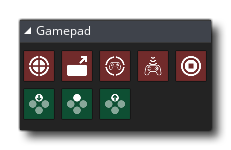
GameMaker Studio 2 has a number of dedicated actions that can be used to detect both analogue and digital controls from multiple connected game pads. These actions require you to specify a gamepad index value, which is a number (counting from 0) that represents the gamepad being selected. Note that when a gamepad is plugged in to your device (or it is removed) then an asynchronous System Event is triggered (however to deal with this you may need to use code).
The gamepad "slots" are indexed from 0 with slots 0 - 3 inclusive being only for Xinput gamepads, ie: Xbox360 controllers and compatibles. However you can also check slots 4 - ii inclusive for DirectInput gamepads, which means you can detect many other models of controller when connected through these slots.
The available gamepad actions are all listed below:

|
Gamepad Get Axis |

|
Gamepad Get Trigger |

|
Gamepad Get Count |

|
Gamepad Get Connected |

|
Gamepad Set Axis Deadzone |

|
If Gamepad Button Pressed |

|
If Gamepad Button Down |

|
If Gamepad Button Released |
Compatibility
The following list shows current compatibility across the
platforms (note that this will change with future updates):
- Windows is fully supported with up to a maximum of 11 connected
devices permitted at once. Note that on Windows, the first 4
gamepad slots (0 - 3) are handled using the XInput dll, meaning
that only XBox controllers may be 100% compatible and that for
other controller types you should check the rest of the gamepad
slots (4 - 11).
- macOS is supported with up to a maximum of 4 connected devices
permitted at once, and these devices can ONLY be of the type
Playstation3 or Xbox 360. Please note that the "Build for Mac
AppStore" option in Mac Game Options needs to be OFF for pad
support to work.
- Ubuntu does also support GamePad input, but you may need to
install additional libraries from the Ubuntu repository. You can do
this easily by opening a command line terminal and typing the
following:
sudo apt-get install jstest-gtk
sudo apt-get install joystick.This will install GUI support for the joystick as well as the joystick itself.
- HTML5 games support gamepads on most major browsers, except
Safari.
- Gamepad support also extends to iOS with the iCade
cabinet. The left axis maps to the stick controller (although the
input is digital, not analogue), the four "face" buttons map to the
cabinet front buttons, and the four shoulder buttons map to those
at the back of the cabinet.
- Android export supports NYKO controllers and generic Bluetooth
controllers (including the OUYA), but only when they are enabled,
meaning that you will have to tick the iCade/Bluetooth option in
the
General section of the Android Game Options. They
require API level 12 for them to work fully and it should be noted
that GameMaker Studio 2 will register as connected any
Bluetooth devices that your device is paired with, whether or not
it's actually connected. Therefore this should be taken into
account when assigning and checking "slots".
- On PS4, if you want to use the touch pad tracking you need to
use the functions for the device_mouse_*
buttons (there are no DnD™ actions for this).