All games have to have sound effects, and most also have music,
which means that you need to be able to add them to your game in
GameMaker Studio 2. This is done through the Sound
Editor, which is opened whenever you create a new Sound
Resource. 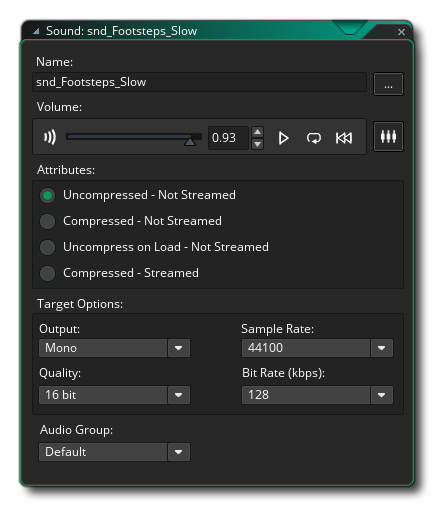
Sounds in GameMaker Studio 2 can be uncompressed or compressed, with compressed sounds having additional options on how to deal with them at run time. Uncompressed sounds are those that have been saved as WAV format files, while compressed sounds can be either MP3 or OGG format. In general you'll want small sound effects to be WAV and larger effects or music to be MP3 or OGG. As with the other different resources, it is recommended that you name your sounds using an appropriate prefix like "snd_" so you can easily identify it later.
Adding a sound is as simple as clicking the add sound button
 and then browsing in the file
explorer that opens to the file you want t use. Once you have
selected one and loaded it in, you can then preview it using the
playback controls shown as well as change certain attributes for
how the file should be exported. if you aren't sure about this,
then simply leave everything "as-is", although if you are adding
music or MP3 format sounds you should probably change to
the Compressed - Not Streamed format. You can find further
information on the sound editor here.
and then browsing in the file
explorer that opens to the file you want t use. Once you have
selected one and loaded it in, you can then preview it using the
playback controls shown as well as change certain attributes for
how the file should be exported. if you aren't sure about this,
then simply leave everything "as-is", although if you are adding
music or MP3 format sounds you should probably change to
the Compressed - Not Streamed format. You can find further
information on the sound editor here.
Note that sounds take up a lot of space on disk, so you should be careful when creating them for your game projects. Do you really need a 48KHz sound effect that only plays for a fraction of a second? Probably not so, think about reducing the sample rate here to 11025 or 22050 for effects, and for longer things like music or for looping effects think also about using a compressed format. Note too that if you plan on using 3D positional audio effects, then the initial sound file must be mono.
You can close the sound editor now and we can move on to creating Objects...